Ceiling Fans with Lamps: The Complete Guide to Buying, Installing, and Loving Your New Fixture

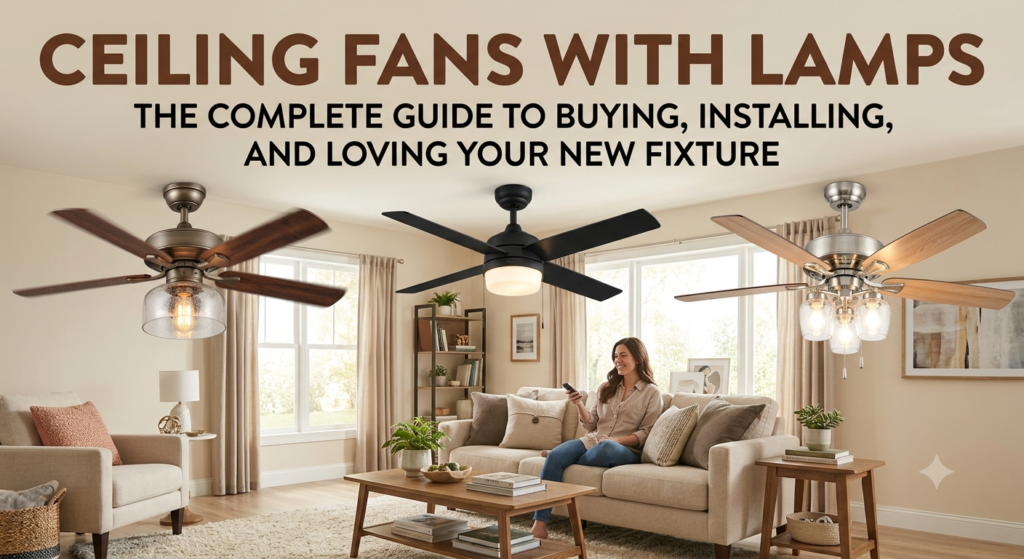
Introduction: One Fixture That Does Two Jobs Better Than Most People Expect
Here is a fact that surprises most homeowners: ceiling fans with lamps can cut your cooling costs by up to 40% compared to running an air conditioner alone. At the same time, they replace your ceiling light completely. That means one single fixture handles both air circulation and room lighting, which saves you money on installation, energy, and even furniture space.
Most people still think of ceiling fans and light fixtures as two separate purchases. They are not. A ceiling fan with a built-in lamp gives you both in one clean, efficient package. The options available today range from simple and affordable to sleek and premium, covering every room style and budget you can think of.
This guide covers everything you need to know about ceiling fans with lamps. You will learn how to pick the right size, what type of light bulb works best, how to install the fixture safely, and which features are actually worth paying for. By the end, you will know exactly what to buy and why.
Why a Ceiling Fan with a Lamp Is Smarter Than Buying Them Separately
Buying a ceiling fan with a lamp built in is almost always smarter than buying them separately. The most obvious reason is cost. A combined unit costs less than purchasing a quality ceiling fan and a separate light fixture to put in the same room. You also pay for one installation instead of two, which cuts labor costs significantly if you hire an electrician.
The second reason is space. A single fixture on the ceiling takes up one electrical box, one mounting point, and one spot on your ceiling. Two separate fixtures would crowd the ceiling and look cluttered, especially in smaller rooms. A combined unit keeps everything clean and centered.
The third reason is energy efficiency. When one motor powers the fan and one set of wires runs the light, the total energy draw is lower than running two separate appliances. Many modern ceiling fans with lamps use LED bulbs and DC motors, making them extremely efficient compared to older models. This combination keeps your monthly electricity bill as low as possible.
How to Choose the Right Size Ceiling Fan with Lamp for Any Room
Size is the single most important factor when buying a ceiling fan with a lamp. A fan that is too small will not cool the room properly. One that is too large will overpower the space and look awkward on the ceiling.
The measurement you need is called the blade span. That is the total diameter from the tip of one blade to the tip of the opposite blade. Match the blade span to your room size using this reference table:
| Room Size | Recommended Blade Span |
|---|---|
| Up to 75 sq ft | 29 to 36 inches |
| 76 to 144 sq ft | 36 to 42 inches |
| 144 to 225 sq ft | 44 to 50 inches |
| 225 to 400 sq ft | 50 to 54 inches |
| Over 400 sq ft | 60 inches or more, or two fans |
Ceiling height matters just as much as floor area. Rooms with ceilings lower than 8 feet need a flush mount or hugger style fan that sits directly against the ceiling without a downrod. Rooms with ceilings between 8 and 9 feet can use a standard mount. Ceilings above 9 feet benefit from a downrod extension that brings the fan blades down to an effective height of around 8 to 9 feet from the floor.
The Best Light Bulb Types for Ceiling Fan Lamps
The type of light bulb your ceiling fan uses affects how bright the room gets, how much energy you spend, and how often you need to replace the bulb. Not all bulbs are equal, and choosing the wrong type can cost you more money over time.
LED Bulbs
LED bulbs are the best option for ceiling fan lamps. They use up to 75% less energy than traditional incandescent bulbs and last up to 25 times longer. A good LED bulb in a ceiling fan can last 15,000 to 25,000 hours before needing replacement. Many ceiling fans today come with LED bulbs already installed, which is a sign of a quality product.
Look for LED bulbs with a color temperature between 2700K and 3000K for warm white light that feels comfortable and relaxing. For home offices or kitchens where you need brighter, crisper light, choose bulbs in the 3500K to 4000K range. Avoid anything above 5000K in living areas because that cool blue-white light feels harsh in a home setting.
CFL Bulbs
Compact fluorescent bulbs use less energy than incandescent but more than LED. They take a few seconds to reach full brightness and do not work well with dimmer switches. Most homeowners are moving away from CFL bulbs entirely because LED technology has become just as affordable and performs better in every way.
Incandescent Bulbs
Incandescent bulbs are the least efficient option. They produce a warm and pleasant light but waste most of their energy as heat rather than light. Many countries are phasing them out due to energy regulations. If your ceiling fan still uses incandescent bulbs, switching to LED equivalents is one of the easiest and cheapest upgrades you can make.
Key Features to Look for in a Ceiling Fan with Lamp
Not every ceiling fan with a lamp is built the same way. Some features genuinely improve your experience, while others are mostly marketing extras. Here is what actually matters when you compare models.
Motor Type: DC vs AC
The motor is the heart of any ceiling fan. AC motors are the traditional type and are found in most budget models. They are reliable but use more electricity and tend to be noisier than modern alternatives. DC motors use up to 70% less energy than AC motors, run much more quietly, and often come with more speed settings. If you plan to run the fan for many hours each day, a DC motor pays for itself quickly through electricity savings.
Number of Speed Settings
Most ceiling fans offer three speed settings. Premium models offer six or more. More speed options give you better control over air circulation and noise level. In a bedroom, being able to set the fan to a very low speed makes a significant difference in how comfortable and quiet the room feels at night.
Remote Control and Smart Compatibility
A ceiling fan with a remote control lets you adjust speed and lighting from anywhere in the room without getting up. This is especially useful in bedrooms. Many newer models also connect to smartphone apps or work with voice assistants like Amazon Alexa or Google Home, letting you control the fan with a simple voice command. Smart ceiling fans are worth considering if you already use a smart home system.
Dimmable Light Function
Not all ceiling fan lamps support dimming. If you want to adjust the brightness of the light, make sure the fan model you choose specifically states that it has a dimmable light function and that it is compatible with dimmable LED bulbs. Using a non-dimmable bulb with a dimmer switch can cause flickering and early bulb failure.
Reversible Motor
A reversible motor lets the fan spin in two directions. In summer, the fan should spin counterclockwise to push air straight down and create a cooling breeze. In winter, switching the fan to spin clockwise at low speed pulls cool air up and pushes the warm air that collects near the ceiling back down into the living area. This simple function can reduce heating costs by 10% to 15% during cold months.
Ceiling Fan Lamp Styles: Finding the Right Look for Your Room
A ceiling fan with a lamp is a visible part of your room’s design. Choosing a style that matches your interior makes the room look more put together and intentional. There are several style categories worth knowing.
Modern and Minimalist
These fans have clean lines, simple shapes, and finishes like matte black, brushed nickel, or white. The light kit is usually integrated into the body of the fan in a sleek way, sometimes using LED strips rather than traditional bulbs. These work well in contemporary homes, apartments, and open-plan living spaces.
Traditional and Classic
Traditional ceiling fans with lamps use decorative elements like carved wood blades, ornate metalwork, and glass light shades. They pair well with rooms that have classic furniture, crown molding, or warm color palettes. These fans often come in bronze, antique brass, or oil-rubbed bronze finishes.
Industrial Style
Industrial ceiling fans feature exposed metal construction, darker finishes, and a raw, utilitarian look. The lamp component often uses Edison-style bulbs or cage-style shades. These work well in loft apartments, home offices, and spaces with exposed brick or concrete elements.
Rustic and Farmhouse
Rustic ceiling fans use natural wood tones, distressed finishes, and simple shaded light kits. They are popular in farmhouse-style homes, cabins, and country-inspired interiors. Many use wood-look blade finishes combined with a matte black or oil-rubbed bronze motor housing.
Coastal and Tropical
These fans use light wood tones, palm-inspired blade shapes, and natural material finishes. The light kits tend to use white or cream shades. They are popular in beach houses, sunrooms, and anywhere you want a relaxed, vacation-inspired feel.
Where to Install a Ceiling Fan with Lamp in Your Home
Ceiling fans with lamps work in almost every room of the house. Each room has slightly different requirements, so it helps to think about placement before you buy.
Bedroom
The bedroom is the most popular room for a ceiling fan with a lamp. The fan keeps you cool while you sleep, and the light replaces the overhead fixture. For bedrooms, prioritize quiet operation above everything else. Look for fans with DC motors and noise ratings below 40 decibels. Also consider a model with a remote control so you can turn the light off and adjust fan speed without getting out of bed.
Living Room
Living rooms often have higher ceilings and larger floor areas than bedrooms. Choose a fan with a blade span of at least 52 inches for most living rooms. The light kit should be bright enough to illuminate the entire room, so look for models that support higher-wattage LED bulbs or multiple bulb sockets. A dimmable light function is especially useful in living rooms where you want different moods for different activities.
Kitchen
Kitchens benefit from ceiling fans because cooking generates heat and steam. Choose a fan rated for damp locations if the kitchen has a lot of moisture. Avoid fans with fabric blades or wood blades that can warp with humidity. A fan with a light kit in the kitchen adds useful task lighting over countertops or dining areas.
Home Office
A home office needs good airflow to stay comfortable during long work sessions. A ceiling fan with a lamp in a home office reduces the need for portable fans and desk lamps, keeping the workspace cleaner and less cluttered. Choose a light color temperature of 3500K to 4000K for the lamp to get bright, focused light that reduces eye strain.
Covered Outdoor Spaces
Covered patios, screened porches, and outdoor dining areas can use ceiling fans with lamps rated for outdoor or damp environments. These models are built with moisture-resistant motors, sealed blade brackets, and weather-resistant finishes. They keep outdoor spaces cool and well-lit during warm evenings without the need for separate patio lights.
How to Install a Ceiling Fan with Lamp: Step by Step
Installing a ceiling fan with a lamp is a straightforward project if you follow the steps carefully. Always turn off the electrical power at the circuit breaker before starting. Use a voltage tester to confirm that no power is running to the ceiling box before you touch any wires.
The ceiling box must be rated to support a ceiling fan. Standard light fixture boxes are not strong enough to hold the weight and movement of a ceiling fan. Fan-rated boxes are sold at any hardware store and are clearly labeled. If your existing box is not fan-rated, replace it before mounting the fan.
Follow the wiring diagram in the manufacturer’s instruction manual exactly. Most ceiling fans have three wires: a black wire for the fan, a blue wire for the light, a white neutral wire, and a green or bare copper ground wire. Connect matching colors together and secure each connection with a wire nut. Never skip the ground wire connection because it is a critical safety step.
Attach the canopy to the ceiling box, hang the fan motor, and then install the blades one at a time. Check that each blade bracket screw is tight. Install the light kit according to the instructions, insert the bulbs, and attach the light shade or globe. Restore power at the breaker and test both the fan and the light before considering the job complete.
If the fan vibrates after installation, the blades may be slightly unbalanced. Most fans include a blade balancing kit with small adhesive weights. Attach these weights one at a time to the top center of each blade until the vibration stops.
How to Replace the Lamp in a Ceiling Fan
Replacing a burned-out bulb or upgrading to LED bulbs in an existing ceiling fan is one of the simplest home maintenance tasks. Turn off the power to the fan using the wall switch before touching the light kit. Give the bulbs a few minutes to cool down if the light was recently on.
Remove the light shade or globe by unscrewing the retaining ring or unscrewing the globe itself, depending on your fan model. Pull the old bulb straight out if it is a pin-based LED, or turn it counterclockwise if it uses a standard screw base. Insert the new bulb and reinstall the shade.
If you want to replace the entire light kit on an older ceiling fan, check whether your fan is designed to accept a light kit add-on. Many fans have a pre-wired port on the bottom of the motor housing where a light kit can be attached. Purchase a universal ceiling fan light kit or one made specifically for your fan model and follow the included instructions.
Energy Savings: How Much Can a Ceiling Fan with Lamp Actually Save You
Energy savings are real and measurable with ceiling fans that include lamps. The numbers depend on your local electricity rate, how many hours you run the fan, and what you are replacing, but the general picture is clear.
A ceiling fan with an LED light kit running at medium speed for 8 hours a day uses roughly 0.3 to 0.5 kilowatt-hours of electricity per day. At an average electricity rate of 13 cents per kilowatt-hour in the United States, that costs about 4 to 6 cents per day. Over a full year, that is roughly 15 to 22 dollars for constant daily use. Compare that to running a window air conditioner for the same hours, which can cost 10 to 20 times more.
The LED light component adds very little to that cost. A 10-watt LED bulb running for 8 hours uses 0.08 kilowatt-hours, which costs less than 1 cent per day. Replacing a 60-watt incandescent bulb with a 10-watt LED equivalent saves you about 5 cents per day in lighting costs alone. Over a year, that single bulb swap saves roughly 18 dollars.
When you combine the energy savings from efficient air circulation with the savings from LED lighting, a ceiling fan with a lamp becomes one of the most cost-effective home improvements you can make. The payback period on a quality unit is typically less than two years for most households.
Common Problems with Ceiling Fan Lamps and How to Fix Them
Even well-built ceiling fans with lamps can develop problems over time. Most issues are easy to fix without replacing the entire unit.
Light Flickering
Flickering is usually caused by a loose bulb connection or an incompatible dimmer switch. Tighten the bulb first. If that does not fix it, check whether your dimmer switch is rated for LED bulbs. Many older dimmer switches are designed for incandescent bulbs and cause LED bulbs to flicker. Replace the dimmer with an LED-compatible model and the problem will likely disappear.
Light Not Turning On
If the fan runs but the light does not come on, the bulb may be burned out or the pull chain or remote control for the light may have an issue. Replace the bulb first as it is the simplest fix. If a new bulb does not solve the problem, check the wiring connection between the fan motor and the light kit. A loose wire is often the cause.
Fan Wobbling or Vibrating
Wobbling is almost always a blade balance problem. Check that all blade bracket screws are tight. If the screws are tight but the wobbling continues, use the blade balancing kit that came with the fan. Attach the small adhesive weights to the top of each blade one at a time, testing after each addition until the wobbling stops.
Noisy Motor
A humming or buzzing noise from the motor can be caused by an incompatible dimmer switch, a loose mounting bracket, or a motor that needs lubrication. Check the mounting first and tighten any loose screws. If the noise continues, consult the manufacturer’s guide to find out whether the motor requires lubrication and what type to use.
Top Ceiling Fan with Lamp Brands Worth Buying
The brand you choose affects the quality, warranty, and long-term reliability of your ceiling fan with a lamp. Some brands consistently deliver better products than others.
Hunter Fan Company
Hunter has been making ceiling fans for over 130 years. Their products are known for quiet motors, strong warranties, and consistent quality across all price ranges. Hunter fans with light kits are widely available at major retailers and come with solid customer support.
Casablanca
Casablanca is a premium brand owned by Hunter. Their fans use high-quality DC motors, offer lifetime warranties on motor components, and come in sophisticated designs. They are among the quietest ceiling fans available and are worth the higher price for bedrooms and main living areas.
Minka-Aire
Minka-Aire produces fans that balance design with performance. Their catalog includes modern, industrial, and transitional styles with well-integrated light kits. They offer both AC and DC motor options at competitive prices.
Progress Lighting
Progress Lighting is a trusted name in the lighting industry that also produces quality ceiling fans with lamp kits. Their products are known for clean designs and reliable performance, with good availability at both online and physical retailers.
Hampton Bay
Hampton Bay is the house brand of Home Depot and offers affordable ceiling fans with light kits across a wide range of styles. Quality varies by model, but their mid-range products offer solid value for budget-conscious buyers. Replacement parts are easy to find since they are sold directly at Home Depot stores.
Ceiling Fan Lamp Maintenance: Keep It Running Like New
Regular maintenance keeps your ceiling fan with a lamp running efficiently and quietly for many years. None of it requires special skills or expensive tools.
Clean the blades every one to two months using a damp microfiber cloth. Dust builds up on the top surface of the blades and reduces airflow efficiency. It also falls off in clumps when the fan is turned on, which is unpleasant for anyone sitting below. A quick wipe every few weeks prevents heavy buildup and keeps the fan looking clean.
Wipe the light shade or globe with a dry cloth to remove dust. For glass shades, remove them carefully once or twice a year and wash them with warm soapy water. Dry them completely before reattaching because moisture near electrical connections can cause problems.
Check all screws twice a year. This includes the screws on the ceiling mounting bracket, the blade brackets, and the light kit. Vibration from normal use loosens screws gradually over time. A loose blade or light kit is a safety issue and should be corrected immediately. Tighten any loose screws with a screwdriver during your regular cleaning session.
Conclusion: A Ceiling Fan with a Lamp Is One of the Best Home Upgrades You Can Make
A ceiling fan with a lamp does two jobs at once, saves energy year-round, improves the look of your room, and pays for itself faster than almost any other home improvement you can make. The options available today fit every room size, every decor style, and every budget from basic to premium.
Remember the most important points: match the blade span to your room size, choose a DC motor for quiet and efficient performance, use LED bulbs for maximum energy savings, and check that your ceiling box is fan-rated before installation. Those four steps alone will ensure you get a product that works well and lasts for many years.
If you are ready to upgrade your home with a ceiling fan and lamp combination, start by measuring your room and setting your budget. Then compare models from trusted brands using the information in this guide. Visit a home improvement store to see options in person, or browse online to compare a wider selection and read real buyer reviews before making your final choice.
Responses